

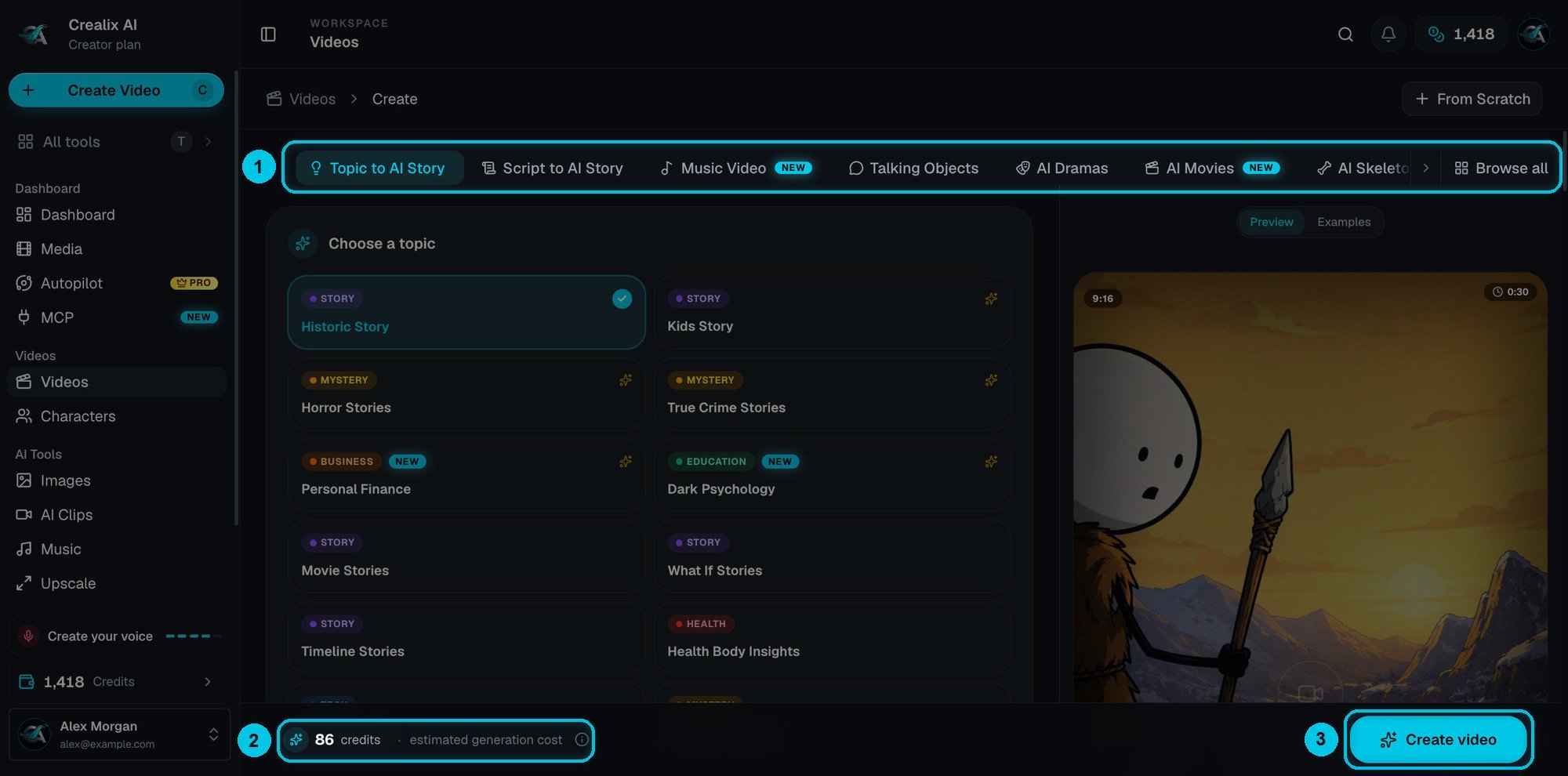
① Format tabs · ② Live cost estimate · ③ Create video
How every format works
1
Pick the format tab
The form below the tabs changes to that format’s settings. Your last choices are remembered, and anything saved in My Brand is pre-filled.
2
Fill the form from top to bottom
Every form is one page of collapsible sections — the idea or script first, then format, look, voice, music, captions and the generation path. Only the first section is required; everything else has a sensible default.
3
Check the preview and the estimate
The Preview panel on the right summarises your choices (switch to Examples to watch finished videos in this format). The bottom bar shows the estimated credits and updates as you change settings.
4
Create, then edit
Click Create video. Credits are reserved, the video is generated in the background (you can close the tab), and it opens in the editor when it’s ready. Unused credits are refunded automatically.
The formats
Narrated stories
Topic to AI Story
Pick a topic → AI image scenes + voiceover. History, horror, finance, kids stories and more.
Script to AI Story
Your script (or a one-line idea) → AI image scenes + voiceover, word for word.
Stock Video
A narrated script over real stock footage, 15 seconds to 20 minutes.
Character videos
Talking Objects
Everyday objects with faces, voices and punchlines.
AI Dramas
Viral micro-dramas starring fruits, food, gadgets, animals or cars.
AI Movies
Cinematic short films up to 2 minutes, with dialogue and your cast.
AI Skeleton
A glass skeleton narrates survival and “what if” stories.
Social formats
Reddit Stories
A Reddit post card narrated over gameplay.
Fake Text Messages
A voiced chat drama in Messages, WhatsApp, Instagram or X style.
Twitter Videos
A narrated tweet thread over gameplay.
Split Videos
Two videos stacked or side by side, with optional narration.
Music and from scratch
Music Video
Turn any song into an AI visual story with an animated waveform.
Studio (From Scratch)
Build every scene yourself and pick any model per scene.
Three families, three cost profiles
Formats fall into three groups, and the group tells you most of what you need to know about cost and speed.
Clip stories let you choose a cheaper review-first path (Scene images or Storyboards first): you approve the images before spending credits on video. See Generation path.
Compare at a glance
*Generation cost with the format’s default settings (images for image stories, full video for clip stories). Rendering is extra in the cloud, or free in your browser. The creator always shows the exact estimate before you create.
Which format should I use?
I want a faceless channel that explains things
I want a faceless channel that explains things
Topic to AI Story for history, science, finance or psychology — it writes the script for you. Use Stock Video when real footage fits better (motivation, travel, business, lifestyle).
I already have a script or a voiceover idea
I already have a script or a voiceover idea
Script to AI Story — choose I have the exact script and Crealix narrates it word for word, only deciding how to split and illustrate it. Stock Video does the same over real footage.
I want maximum retention on TikTok and Shorts
I want maximum retention on TikTok and Shorts
Reddit Stories, Fake Text Messages and Twitter Videos over gameplay are cheap to produce and proven to hold attention. AI Dramas and Talking Objects stand out in the feed because they have characters.
I want something cinematic
I want something cinematic
AI Movies for short films with dialogue and a twist, or Script to AI Story with Full AI Video for a narrated cinematic piece.
I make music
I make music
Music Video turns your track into a visual story with an animated waveform. Make the track itself with AI Music.
I need full control over every shot
I need full control over every shot
Studio — you write every scene, pick the model, voice and media for each one, and nothing is generated unless you ask.
I want to publish every day without doing it by hand
I want to publish every day without doing it by hand
Almost every format can run as an Autopilot series: describe the series once and Crealix makes and publishes new episodes on a schedule.
Settings every format shares
Aspect ratio, duration, language, image quality, visual style, voice, music, captions, characters and the generation path — explained once.