

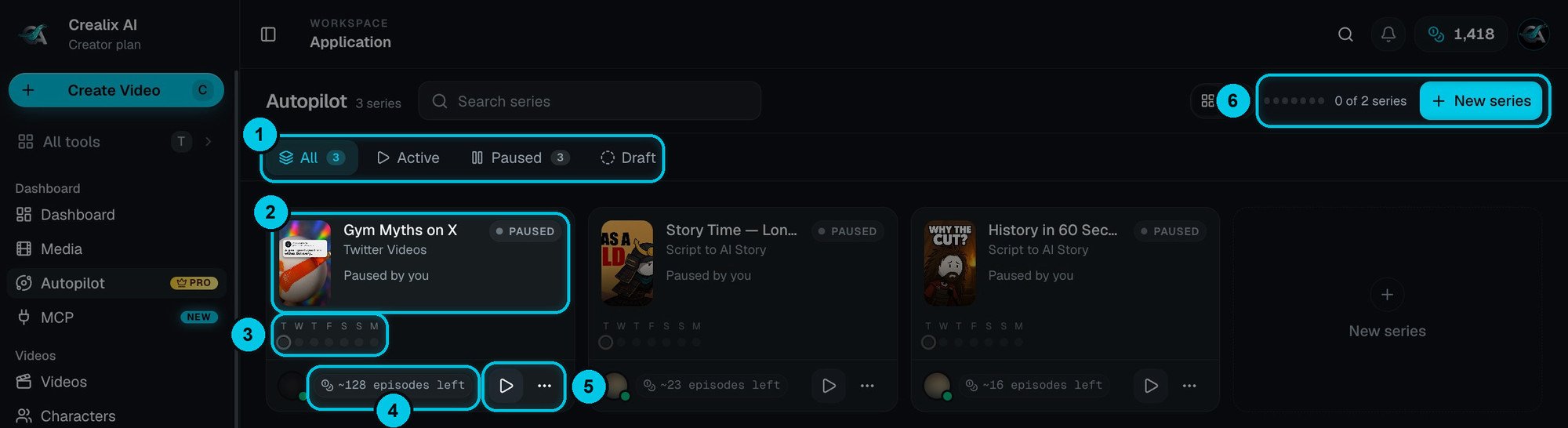
① Filters · ② A series card · ③ Days it posts this week · ④ How many episodes your credits cover · ⑤ Play / pause and more · ⑥ Series running and New series
How it works
Plans
For every slot in your schedule, Autopilot invents a new episode idea from your brief, your own idea list, the pages you gave it and your rules. It remembers what it already covered, so it never repeats a theme.
Produces
Before each slot it writes, voices and generates the episode — picking a voice, visual style, music and caption style from the pools you chose, so the channel stays fresh without going off-brand.
Waits for you (optional)
If the series uses approvals, it emails you a preview. Rendering and publishing only happen after you click Approve & render.
Publishes
It renders and posts to your TikTok, YouTube and Instagram accounts at the scheduled time — or emails you a link to watch and download each episode.
The Autopilot page
Open Autopilot in the sidebar to see every series you have.- Filters (①) — All, Active, Paused and Draft, with a count on each. Switch between grid and list view at the top right.
- Series cards (②) — the series name, its format, its status (Active, Paused or Draft) and why it’s paused, if it is.
- This week (③) — one dot per day for the next seven days; filled dots are days with an episode.
- Episodes left (④) — roughly how many more episodes your current credit balance covers.
- Play / pause and ⋯ (⑤) — pause or resume a series without opening it; the menu has the rest.
- Series counter and New series (⑥) — how many series are running out of the number your plan allows, and the button to start a new one.
What a series can make
Every episode is a full video in one of these formats: Topic to AI Story, Script to AI Story, Music Video, Talking Objects, AI Dramas, AI Movies, AI Skeleton, Reddit Stories, Fake Text Messages, Twitter Videos, Split Videos and Stock Video. Each format works exactly as it does by hand — see Video formats.Limits by plan
- Most episodes a day is your series × times a day, with a ceiling of 6 a day across all your series (7 on Enterprise) — so Starter publishes at most 1 a day and Creator 4.
- Drafts don’t count. You can keep drafts around; the limit applies when you activate a series.
- Three times a day at most per series on every plan — more than that reads as spam to the platforms.
- Without a paid plan you can build one draft series and test how the planner reads your brief, but you can’t activate it.
What it costs
Each episode costs the same as making that video by hand, plus the render: +1 credit per episode at 720p or +4 credits at 1080p (recommended). Series settings show a live estimate in the footer — for example ~11 credits per episode · ~77 per week — you have 1,418 → ~18 weeks. Credits are only spent when an episode is actually produced. Skipped episodes cost nothing, failed work is refunded, and with approvals on you never pay to render something you didn’t approve.Create a series
The six-step wizard, with templates.
Episodes & calendar
Review, approve, reschedule and skip.
Series settings
Every option, explained.