

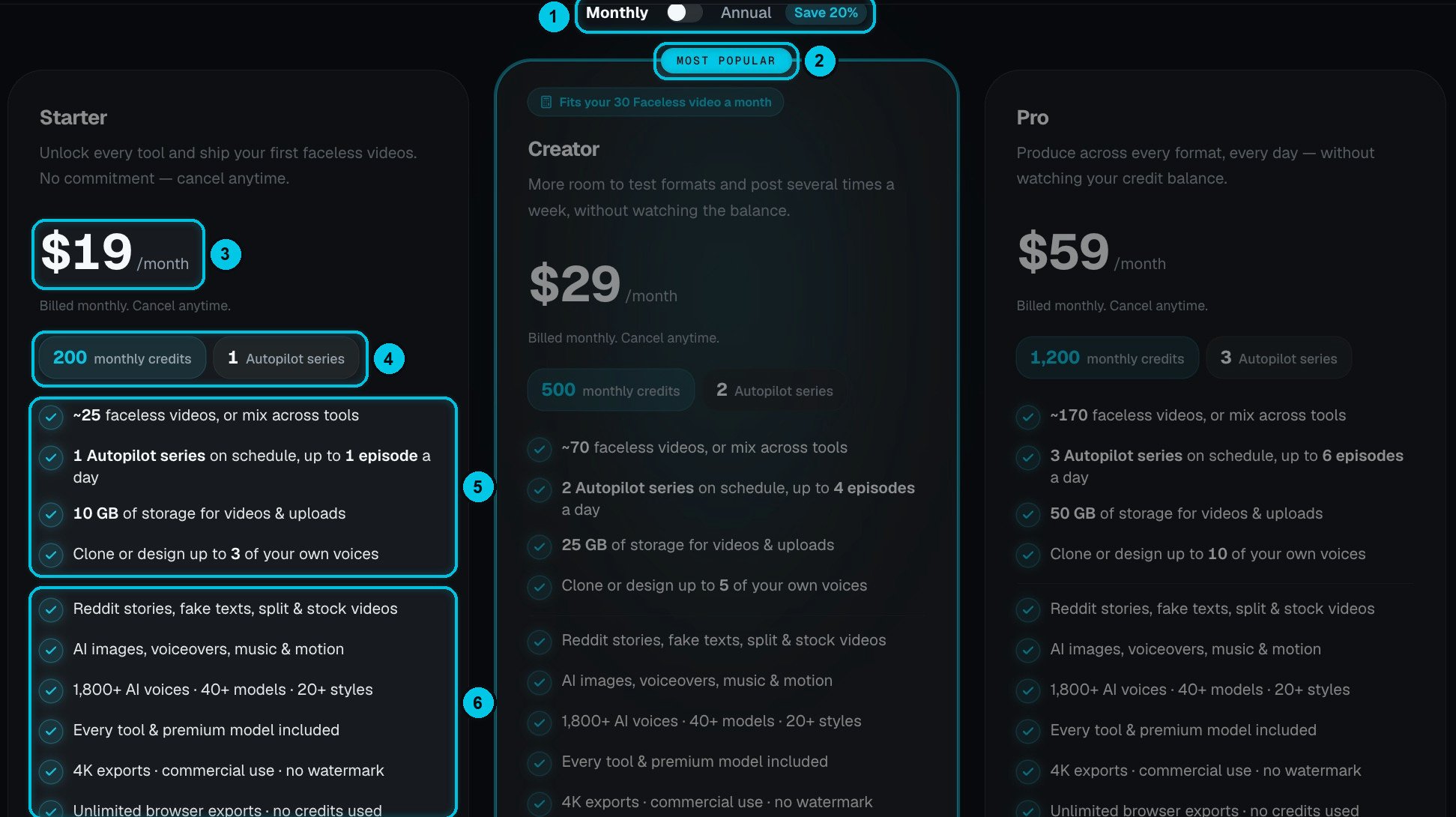
① Monthly or annual billing · ② The most popular plan · ③ Price · ④ Monthly credits and Autopilot series · ⑤ What changes by plan · ⑥ What every plan includes
Compare plans
Creator is the most popular plan (②).
Included in every paid plan
Create
Every format and AI tool, 40+ AI models, 1,800+ voices in 29 languages, 48 caption presets, your own captions, styles and brand mark.
Export
No watermark, up to 4K exports, unlimited free browser exports, and commercial use.
Publish
Direct publishing to TikTok, YouTube Shorts and Instagram Reels, plus Autopilot series.
Peace of mind
Failed generations are refunded, and you can run up to 5 generations at once per tool.
What can I make with each plan?
Rough monthly estimates for 30-second videos with basic image quality and free browser export:
These are examples, not quotas — one credit balance covers everything, so you can mix formats and tools any way you like. The plan calculator on the pricing page estimates your needs from the video type, how often you post, the length, images vs animated clips, and whether you export in the cloud.
The free plan
Without a plan you can sign up, explore every tool, and create and preview videos in the editor with your welcome credits. Rendering, downloading and publishing a finished file — and running Autopilot — need a paid plan. Videos previewed on the free plan show the Crealix watermark. The free plan includes 1 GB of storage and one designed voice.Monthly or annual
- Annual billing saves 20% (①). You’re billed once a year and your credits refill every month.
- Plan credits are valid until the end of each billing period. Credits you buy separately never expire. See Credits.
Change or cancel your plan
Upgrading
Upgrading
An upgrade starts immediately: you’re charged the new plan’s price today, your billing cycle restarts from today, and the new plan’s credits are added right away.
Downgrading
Downgrading
A downgrade takes effect at your next renewal. You keep your current plan and credits until then.
Cancelling
Cancelling
Cancel any time from Settings › Billing Information. Your plan stays active until the end of the period you paid for; then the account returns to the free plan. Purchased and gifted credits stay in your wallet, and your files stay stored — but creating pauses while you’re above the free plan’s storage.
Failed payments
Failed payments
If a renewal payment fails, we email you and retry, and your plan keeps working in the meantime. Update your payment method in Billing Information to keep your plan. After repeated failed attempts the subscription is cancelled automatically.