

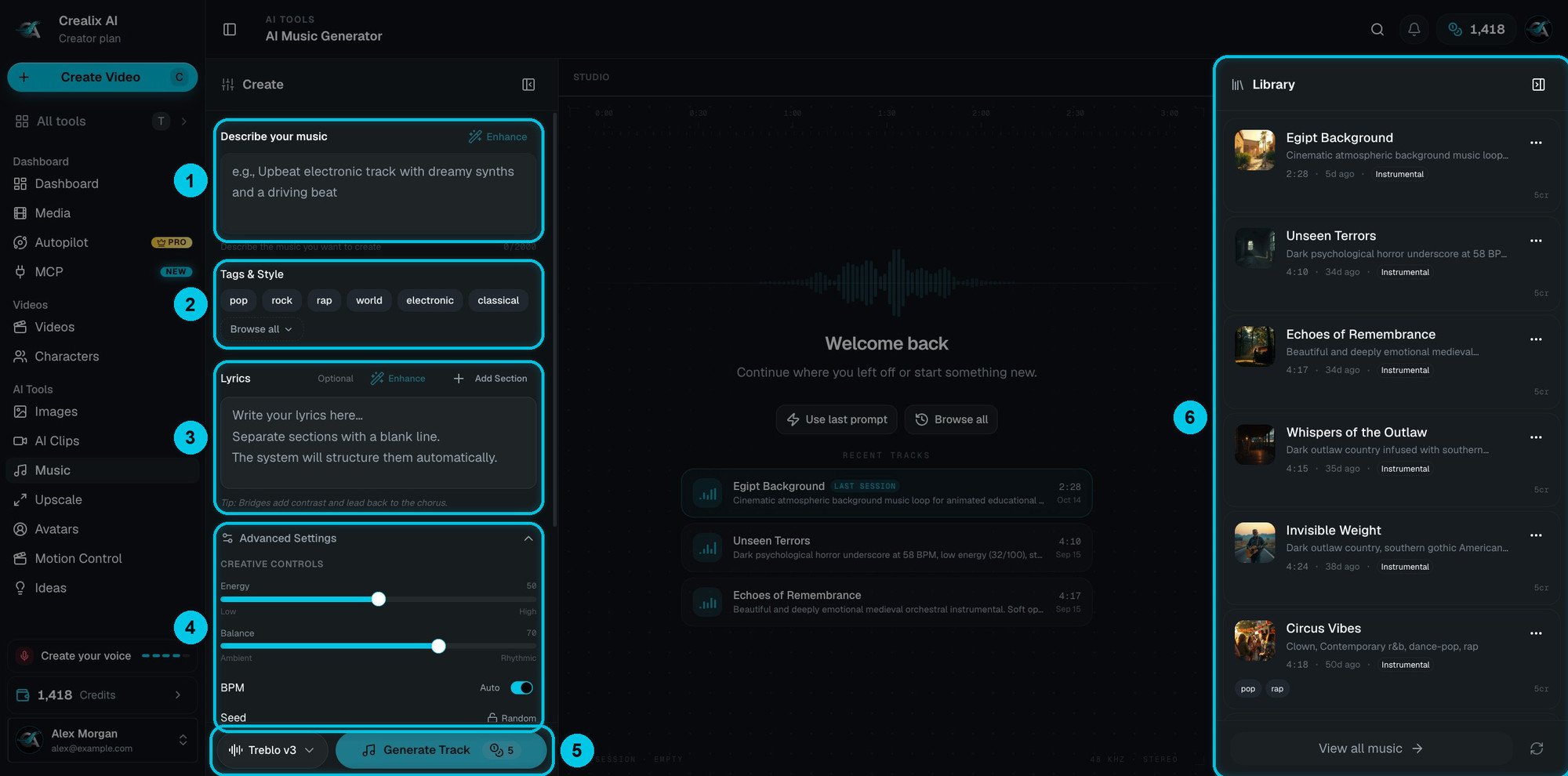
① Describe your music and Enhance · ② Tags & Style · ③ Lyrics and Add Section · ④ Advanced Settings · ⑤ Model and Generate Track · ⑥ Library
Generate a track
1
Choose the model
Two models, both 5 credits per track (⑤):
- Lyria 3 Pro (default) — accepts a description, tags and lyrics together.
- Treblo v3 — full studio control: a seed, the output format and lyrics aligned to the music. Use a description or tags with your lyrics, not all three at once.
2
Describe your music
In Describe your music (①), up to 2,000 characters: the genre, the mood, the instruments, the tempo and where it will be used. For example: “Dark cinematic synthwave for a true-crime short, slow build, heavy bass, no vocals”. Click Enhance to expand a short idea into a full description.
3
Add tags and style
Tags & Style (②) — pick genre and mood tags: pop, rock, rap, world, electronic, classical and more. Browse all shows every tag.
4
Write lyrics — or leave them empty
In Lyrics (③):
- Leave it empty for an instrumental.
- Write your own lyrics and use Add Section to structure them — verses tell the story, the chorus repeats the hook.
- Enhance writes or polishes the lyrics for you.
5
Fine-tune (optional)
Advanced Settings (④):
- Energy — from calm to intense.
- Balance — from ambient to rhythmic.
- BPM — the tempo, or auto.
- Seed (Treblo v3) — reuse a number to reproduce a result you liked.
- Output format (Treblo v3) — the file type.
6
Generate
Click Generate Track. The price is always shown on the button.
If the provider rejects a generation — for example because the lyrics or the prompt match copyrighted material — your credits are refunded. Don’t name real artists or paste existing lyrics.
Tips
- Say where it’s going. “Background for a 60-second motivational short” gives a better-fitting track than a genre alone.
- Instrumentals under narration. If a voice will talk over the music, leave the lyrics empty and ask for “no vocals, low energy”.
- Start strong for hooks. For dance or meme videos, ask for “no intro, starts on the beat”.